Asking questions in natural language and receiving coherent, contextual answers is no longer seen as futuristic; it is becoming habitual and increasingly embedded across applications, from search and analytics to customer support and productivity tools. This shift is fundamentally reshaping how people engage with data and technology, setting the stage for more intuitive, accessible, and pervasive conversational experiences.
In the past, I wrote about the Oracle Analytics AI Assistant with a fair amount of skepticism. In this article, I take a closer look at how it has evolved since then and how these advancements have reshaped my initial judgment.
Starting a Conversation with Data
In OAC, starting a conversation with data is now as simple as using the home page search bar, which has become the new front door to analytics. Rather than just matching keywords to existing content or triggering basic visualizations, users can ask questions and receive a complete, system-generated dashboard in response. Drawing from indexed datasets and subject areas, the experience includes a LLM-generated insights summary, up to five relevant visualizations, and links to related content (Figure 1).
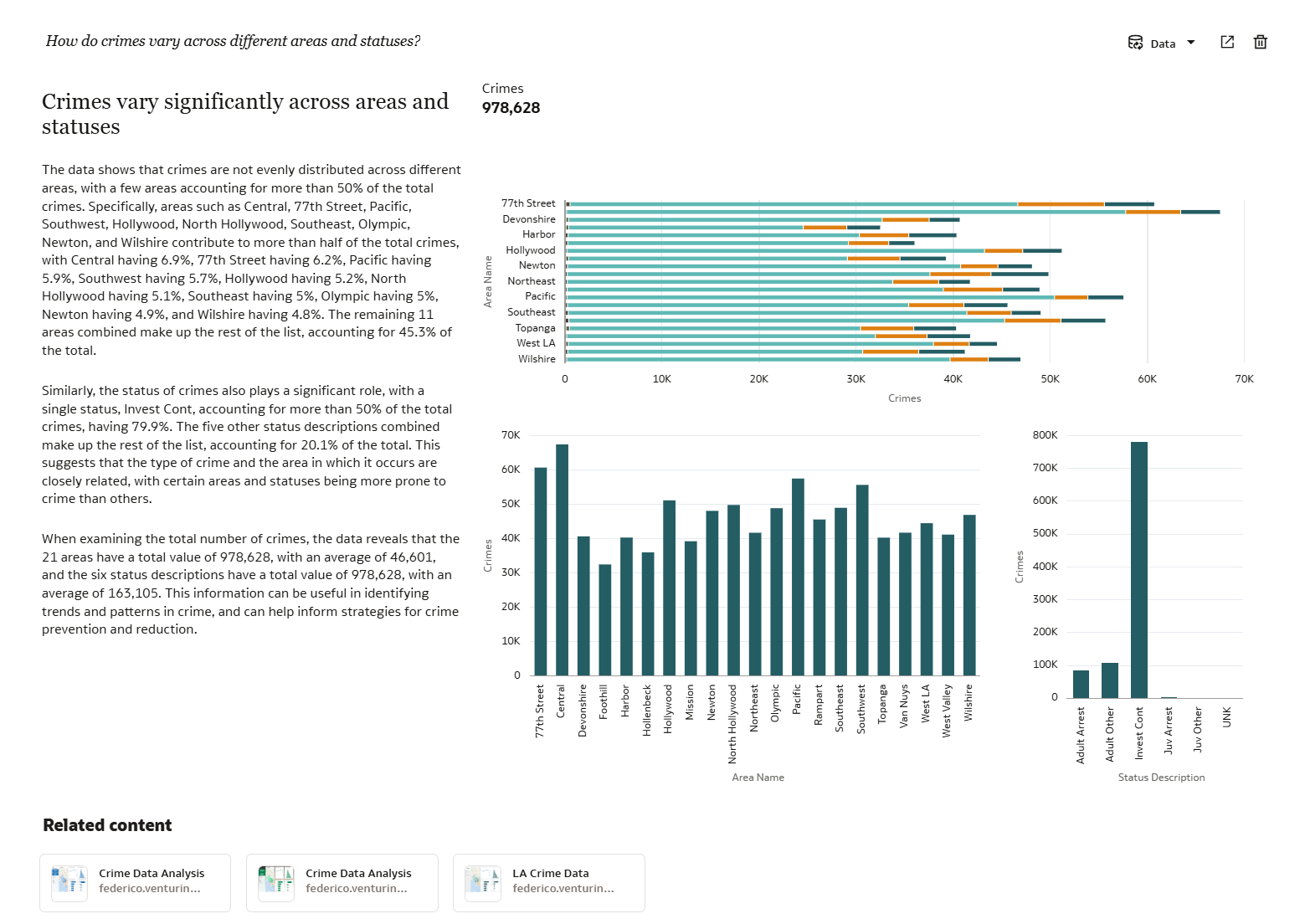
Follow-up questions dynamically update the visualizations while retaining context, enabling natural exploration without starting over. Each generated dashboard is saved as a thread on the left side of the page, allowing users to quickly revisit and toggle between results. In scenarios where multiple datasets or subject areas could potentially answer a user question, OAC automatically selects the source it considers the most relevant. At the same time, users always retain control and can switch to a different dataset or subject area, instantly adapting the generated response and visualizations accordingly.
Extending the Conversation
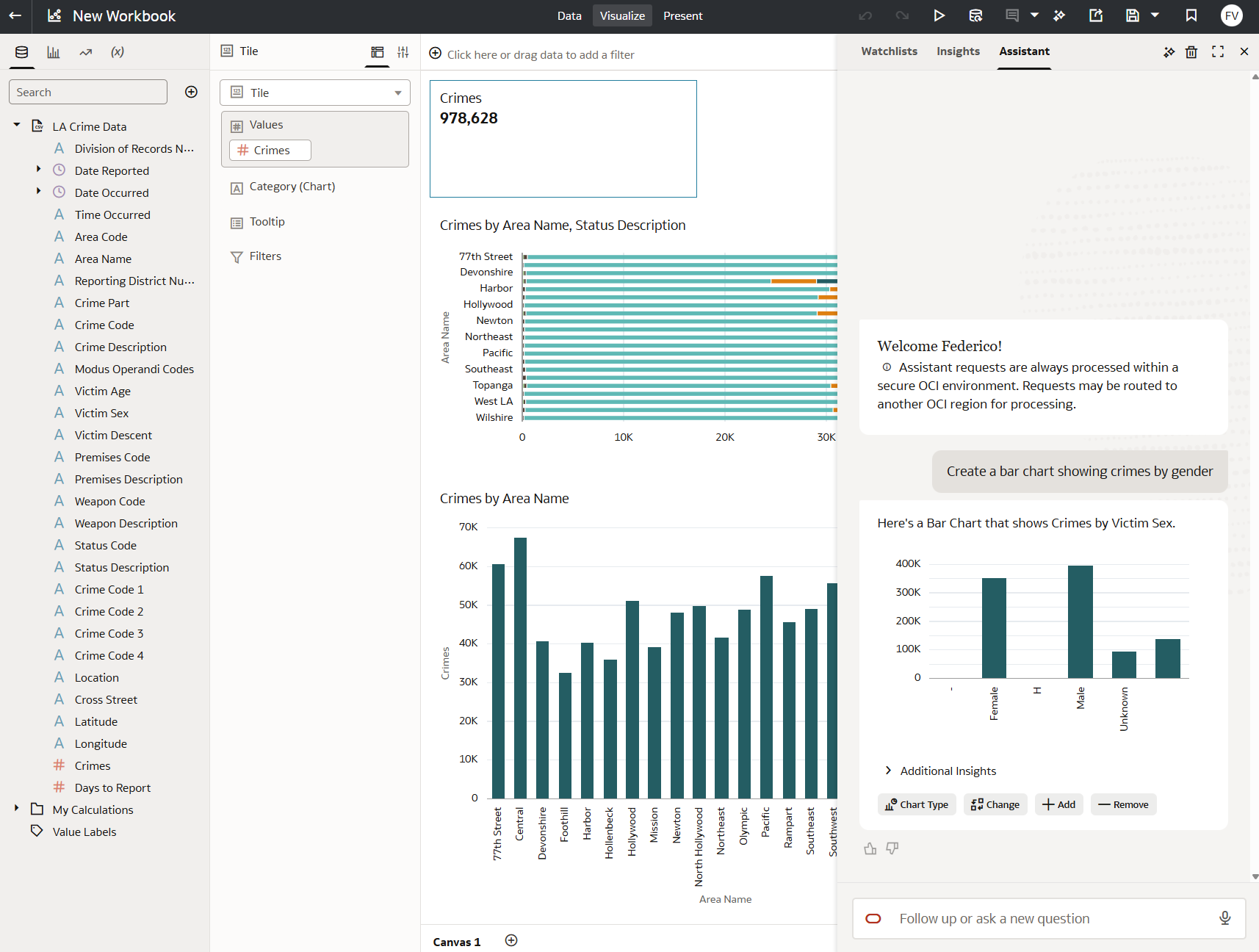
One of the most interesting aspects of the experience is how conversations can evolve beyond the initial response. With a click, users can continue the conversation inside the workbook editor: the visualizations are automatically added to the workbook canvas, where authors can further modify them, refine the layout, or customize calculations using the editor capabilities. Within the workbook editor, the Assistant panel can be used to generate entirely new visualizations and insert them directly into the workbook (Figure 2).
The same experience can optionally be exposed also when the workbook is opened in presentation mode. In this scenario, consumers can ask additional questions that are not explicitly covered by the original workbook content and receive contextual answers generated on the fly. Responses can be added to watchlists for future reference, while the underlying workbook itself remains protected and cannot be modified.
Grounding AI Assistant with AI Agents
With the January 2026 Update, AI Agents have been introduced in Oracle Analytics Cloud, significantly expanding the capabilities of the AI Assistant. They allow organizations to define custom prompt instructions and combine semantic models and curated datasets with support documents, enabling richer and more informed answers while still maintaining governance and consistency (Figure 3).
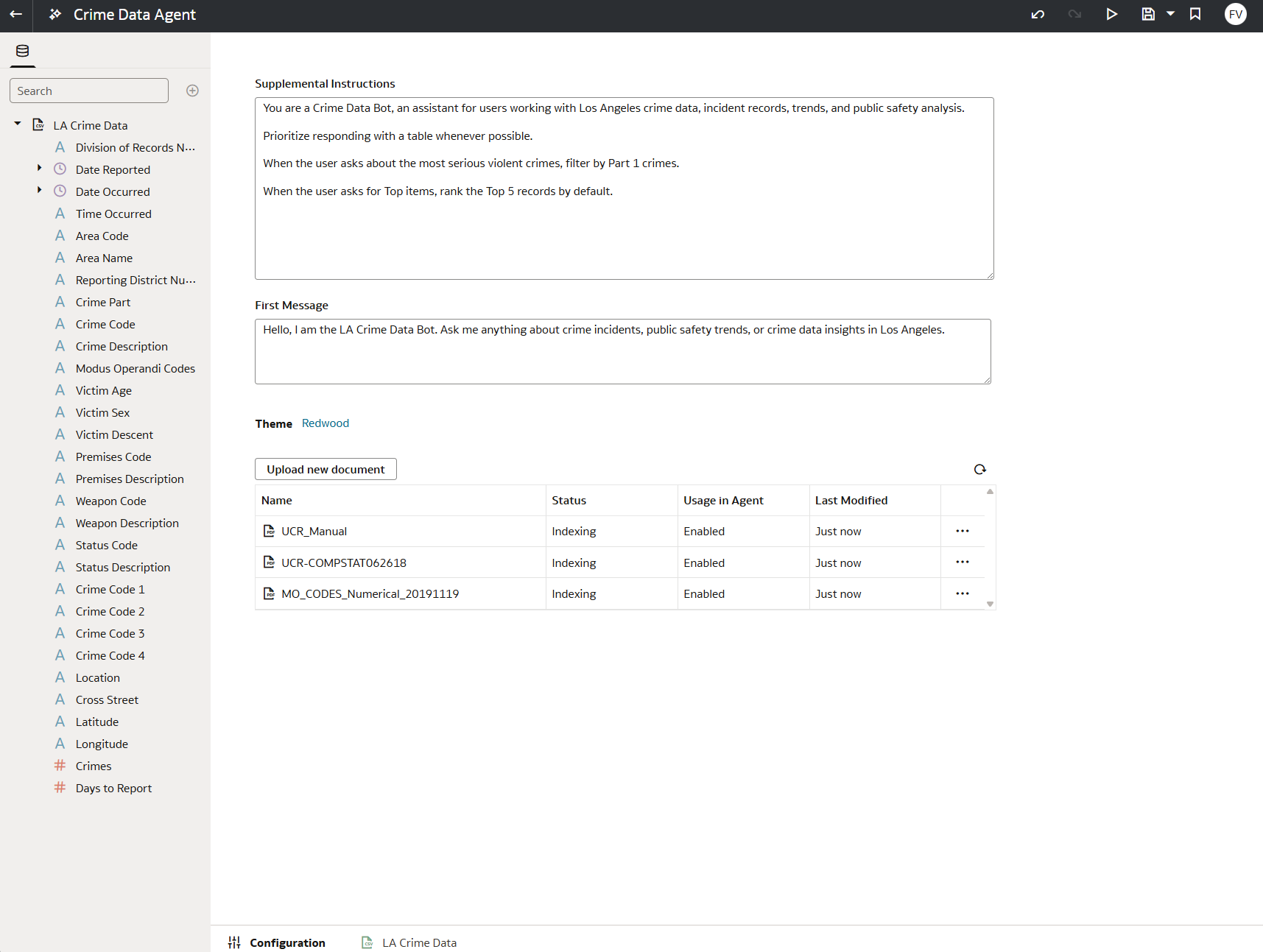
AI Agents can be used independently or integrated directly into workbooks. When embedded into a workbook experience, they become available during presentation mode and can answer user questions using datasets and subject areas beyond those originally used to build the workbook itself. This is particularly important because it allows organizations to design specialized conversational experiences tailored to specific business domains, departments, or use cases. In practice, this transforms a workbook from a static presentation layer into a conversational entry point to a broader business knowledge ecosystem.
What Makes Oracle Analytics Unique
The real value of these capabilities in Oracle Analytics is not simply the presence of generative AI, but the way it is applied on top of subject areas and curated datasets specifically designed to support business needs while abstracting the complexity of underlying data sources. They already encapsulate business calculations, KPIs, hierarchies, and domain-specific logic that would otherwise require deep technical knowledge to reproduce correctly. Equally important, existing security models are preserved. Row-level security rules are automatically enforced by the AI Assistant, ensuring that generated answers remain consistent with each user’s permissions and data access policies.
This combination of semantic modeling, governance, and security is what differentiates the conversational experience in Oracle Analytics from generic LLM experiences. Rather than generating answers from raw data, the AI Assistant leverages trusted business models that organizations already rely on for reporting and decision-making.
Conclusion
Despite the significant progress, I still personally prefer building visualizations directly through the workbook editor rather than relying entirely on AI-generated content. For experienced authors, manual design remains faster, more precise, and better suited for creating polished analytical experiences.
However, the new conversational experience and the introduction of AI Agents fundamentally change the equation for business users. Most of them are not looking to design visualizations from scratch; they simply want quick answers, contextual insights, and the ability to explore data naturally without learning complex authoring tools.
In that context, the conversational experience in Oracle Analytics becomes much more than a productivity feature. It lowers the barrier to accessing enterprise data, expands self-service capabilities, and allows organizations to expose governed analytics through interfaces that feel significantly more intuitive and approachable for non-technical users.